
MANAGING MOBILITY IN MOBILITY-ONLINE: A GUIDE FOR UT STAFF
At UT, we believe in the power of knowledge and continuous improvement. If you seek guidance on managing changes to a student's application within Mobility-Online, you are in the right place.
Updating your role/title
Has your role or title changed? No worries! We aim to keep all UT supervisors in the Mobility-Online loop. If your recent title change slipped through the cracks, do not hesitate to reach out. Send us an email at mobility-online@utwente.nl, and we will assist you.
Changes in application
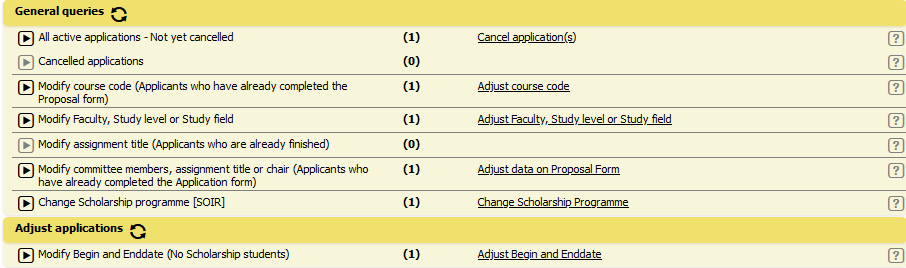
Are you a staff member ready to change a student's application? Here is a step-by-step plan:
- Locate the application: Find the application needing attention.
- Switch to the application's "Pipeline" tab.
- Look for the highlighted yellow section.
- Click on the respective link to initiate changes.
- Make your changes and hit "Adjust Data on Proposal Form."
Quick and advanced searches
Efficiency is key, and our search features can help you look for the information you need.
- Quick search: Located in the top navigation bar, it is great for lookups using unique identifiers like student numbers, emails, or application IDs.
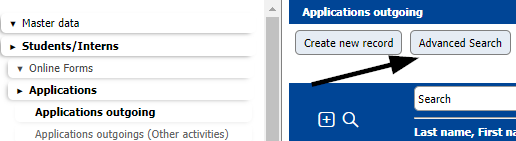
- Advanced search: Do you need more precision? Head to Students/Interns > Applications > Applications Outgoing/Incoming. Click on "Advanced Search," filter by your criteria, and hit "Execute Search."
Authorisation
- Request Authorisation: Find the form here.
- Revoke Authorisation: Ready to leave Mobility-Online? Let us know by filling out the Revoke Authorisation Form.
Email sent to students
Digging into emails sent to students is easy within Mobility-Online!
- Locate Emails Sent: Navigate to the "E-mails(xx)" tab within the student's application.
- Discover the Details: Get a comprehensive list of all emails, whether automated or sent by a dedicated member of our staff.

FAQ
My degree changed. How is this updated in Mobility Online?
We strive to update all UT supervisors within Mobility Online regularly. If the change in your title has been missed or occured shortly after a recent update, please send an email to mobility-online@utwente.nl and we will make the neccessary changes.
How do I change small parts within an application on behalf of a student?
Within every pipeline there are sections highlighted in yellow. Here you can find action links that allow you to make changes to certain parts of an application.
Please be aware that changing dates can have an effect on scholarships! Thus, contact the scholarship office first before adjusting dates in the mobility.
The scholarship office can be reached via studyabroad@utwente.nl
Please follow these steps:
- Look up the application where the changes need to be made.
- Enter the application and switch to the tab "Pipeline".

- Scroll down to the yellow section and click on the respective link.

- Make the changes and click on "Adjust data on Proposal Form".
What is quick search?
The quick search is located in the top navigation bar. It is the ideal tool for looking up a specific student or application.
It works best for unique identifiers, such as the student number, email or application ID.

What is the advanced search?
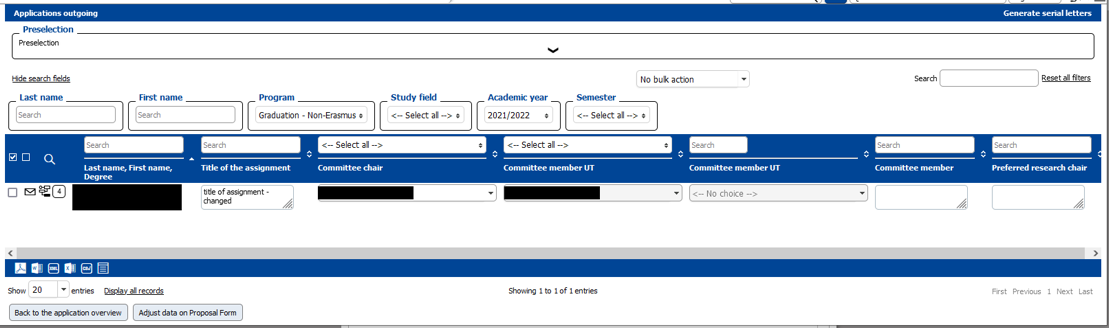
The advanced search allows you to filter your search; for example by registration date or by faculty.
To access the advanced search go to Students / Interns > Applications > Applications Outgoing / Incoming
Click on "Advanced Search"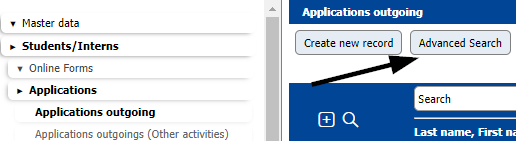
The search opens, allowing you to enter values by which to filter. In the screenshot below, a value for the create date is entered. Once you have entered your filters, click on "Execute search" located on the top.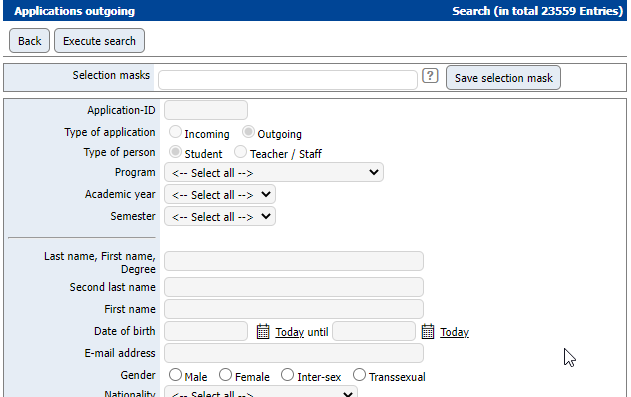
Only registrations that meet the entered criteria will be shown; for this example there are all registrations made on 18/02/2022 at the time the search is executed.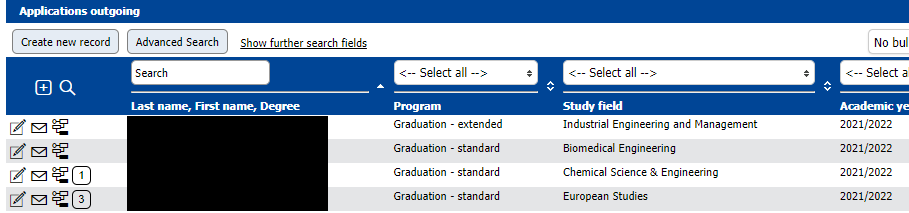
Where do I find the authorisation request form?
The authorisation request form can be found here:
Request authorisation Mobility-Online | Home EDU systems (utwente.nl)
What do I need to do when I don't need access to Mobility Online anymore?
When you no longer need access to Mobility Online, please let us know by filling out the Revoke Authorisation Form. You can find it here:
Revoke authorisation Mobility-Online | Home EDU systems (utwente.nl)
Where do I find emails sent to students from Mobility Online?
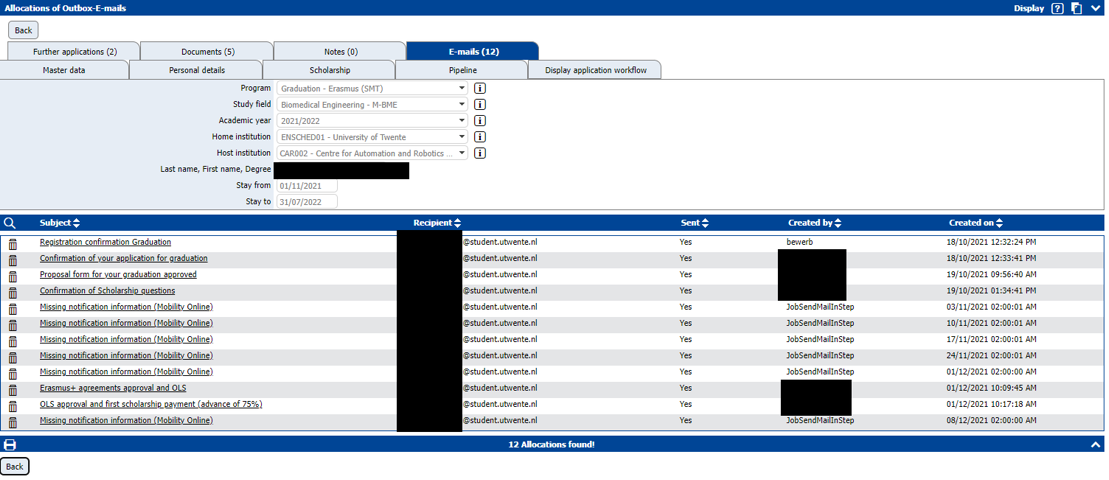
Any emails sent from Mobility Online to a student can be found within the student's application. Go to the tab "E-mails(xx)".
There you can find a list of all emails, which the student received. It is indicated whether it was an automated email or which employee sent the email.

What does data cleaning for Mobility-Online entail?
What changes can I expect from the new pipeline layout?
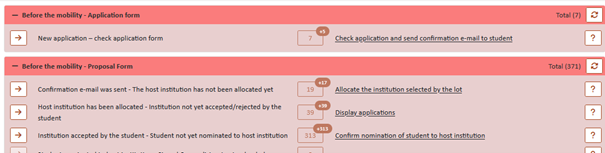
Some features have been added to increase the user-friendliness of the system. The below screenshots have been taken from the test environment, which is the reason the main colour scheme is in brown. The production environment is still in blue as you are used to, no worries there.
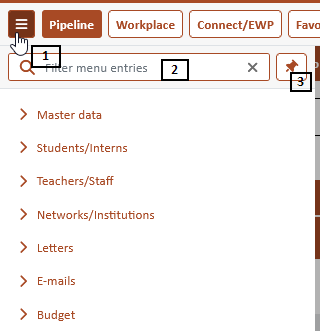
The menu is now collapsable (1), thus making your screen cleaner and giving you more space to view the pipeline. You can search within the menu (2) and should you prefer to have the menu visible at all times you can click on the icon to the very right (3) to pin it in place.
As you can see below, all lines have become tighter. The link to open all steps at once has been moved to the right. The same is true for the icon to view all applications at once regardless of the step they are in.
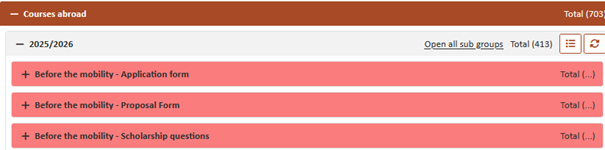
Within the sub-categories the icons indicating new applications in a step have become a little smaller, yet the question mark icon has become more visible on the line.
Which roles are available and what are they used for?
Role Name | Role Description |
Departmental Coordinator | This is used most often by faculty employees. This gives access to incoming and outgoing student pipelines (processes). |
BOZ | As the name already implies, this is used by all BOZ employees. |
International Officer | This is used by CES-SAS employees who facilitate incoming students. This role only has acces to the incoming pipelines (processes). |
Scholarship Officer | This is used by CES-SO&IR employees who handle all things related to scholarships and/or staff mobility. They have acces to the outgoing student pipelines (processes) and both incoming and outgoing employee pipelines (processes). |
Contract Manager | This role is solely used by employees who manage and update the agreements in Mobility-Online. they do not have access to any pipeline. |
Read only staff | This role is for employees who need to get some information from Mobility-Online but do not work with the pipelines. They are unable to change anything in student/employee applications. |
Student Services | This is a read-only role designed for student services in order to assist the student with any questions they might have. |
Key user | As the name already implies, this role is used for key-users or faculty contactpersons. They have extra rights compared to most roles (e.g. they are able to do some textual changes in mail templates etc.). They also are able to see all pipelines in order to have the ability to assist their users with simple tasks and problems. |
Administrator Customer | This role is able to build pipelines/workflows and is able to make some changes on a database level in Mobility-Online. This is used by BIM, in rare cases LISA development or CES-SO&IR will be allowed this role as a temporary solution to build reports or create budget changes or make very technical changes. |
Staff Mobility | If a UT staff member registers for a staff mobility, he / she will receive this additional role enabeling the staff member to complete his / her own application. |
Partner | This role is used for our partner universities, who use our Mobility-Online system to nominate their students based on our contracts, which are maintained in Mobility-Online. |